Building the Stage: Platforms and Tools for AI Orchestration
By Conny Lazo
Builder of AI orchestras. Project Manager. Shipping things with agents.
I've built AI orchestras on 6 different platforms. Each one taught me something about what works and what doesn't.
The platform you choose isn't just tooling. It's the foundation that determines what's possible.
Choose wrong, and you'll spend months fighting limitations instead of building solutions.
The Platform Landscape
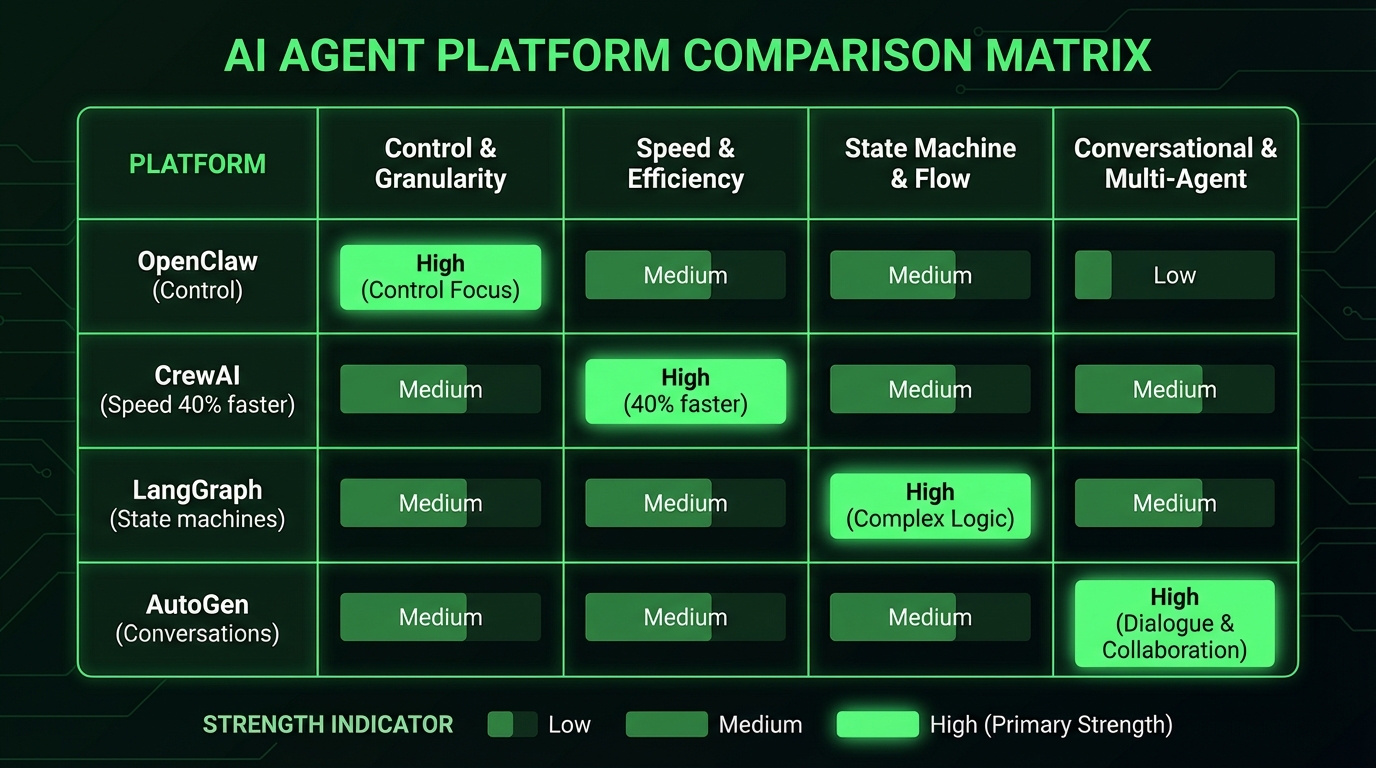
OpenClaw: Where I do my serious work. Deep Claude integration, MCP protocol support, powerful orchestration primitives. Built by Peter Steinberger, who recently joined OpenAI — which raises sustainability questions I'll address below.
CrewAI: 40% faster to production according to dev.to analysis. Great for standardized workflows, excellent for teams, strong community support.
LangGraph: Best for complex state machines. When your orchestra needs conditional branching, loop handling, and sophisticated state management.
AutoGen: Microsoft's bet on multi-agent conversations. Strong for collaborative tasks where agents need to debate and decide together.
I've shipped production systems on all of them. Each has its place.
Why I Chose OpenClaw
OpenClaw gives me something the others don't: complete control over agent behavior.
My Toscan agent runs on OpenClaw with:
- Native Claude API integration (no wrapper overhead)
- MCP (Model Context Protocol) for standardized tool access
- Real-time browser automation via Playwright
- Voice synthesis through ElevenLabs
- Direct file system access with safety boundaries
- Native Docker integration for containerized tasks
Last week, Toscan ran my entire content pipeline:
- Research agent scraped 15 sources on AI orchestration
- Writing agent synthesized insights into article drafts
- Image generation agent created infographics via Gemini
- Publishing agent formatted for LinkedIn and scheduled delivery
All coordinated through OpenClaw's orchestration layer. Zero manual intervention.
CrewAI: Speed to Market
When I need to prototype fast, I use CrewAI.
It's opinionated in the best way. Sensible defaults, clear agent roles, established patterns. Perfect for business teams who want AI orchestration without deep technical complexity.
I built a customer research orchestra in CrewAI for a client project:
- Researcher agent: Gathered competitive intelligence
- Analyst agent: Processed data into insights
- Reporter agent: Generated executive summaries
From concept to deployment: 3 days. Same system in raw Python would have taken 3 weeks.
CrewAI's strength is convention over configuration. When you fit their patterns, you move fast. When you don't, you fight the framework.
LangGraph: The State Machine Master
Complex orchestration needs sophisticated state management. That's where LangGraph excels.
I used LangGraph for my CPMS (Charge Point Management System) planning orchestra:
Research Phase → Analysis Phase → Planning Phase → Validation Phase
     ↓              ↓              ↓              ↓
  5 agents      3 agents       2 agents       1 agent
Each phase had conditional transitions based on agent outputs. Research quality determined analysis depth. Analysis results determined planning complexity.
LangGraph handled the state transitions beautifully. The visual debugging tools showed exactly where decisions were made and why.
The Terminal Is Still King
Regardless of platform, the best AI agents work through terminal interfaces.
I've tested GUI-based agent builders. They're impressive demos. Terrible for production.
Real work happens in terminals:
- Claude Code: My primary coding agent, runs in CLI
- aider: Excellent for pair programming workflows
- Codex CLI: Good for quick scripting tasks
Why terminals win:
- Precision: Exact commands, exact outputs
- Automation: Easy to script and orchestrate
- Speed: No GUI overhead, no mouse clicks
- Reliability: Consistent behavior across environments
My most productive agents never touch a GUI. They live in tmux sessions, connected to my OpenClaw orchestrator, executing precise terminal commands.
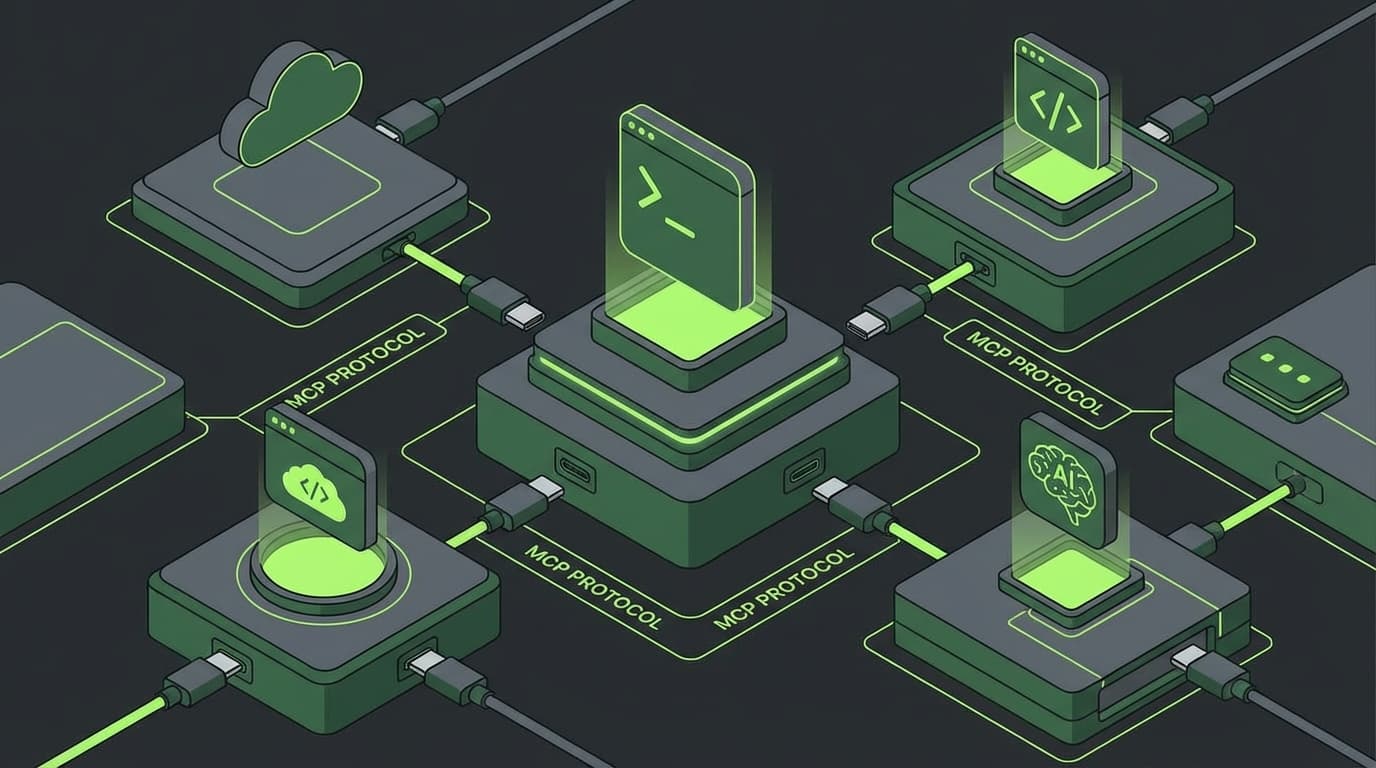
MCP: The USB-C for AI
Model Context Protocol (MCP) is the most important development nobody talks about.
It's standardized tool access for AI agents. Instead of every platform reinventing browser automation, file access, and API integration, MCP provides common interfaces.
OpenAI adopted MCP in March 2025. BCG called it "USB-C for AI." They're right.
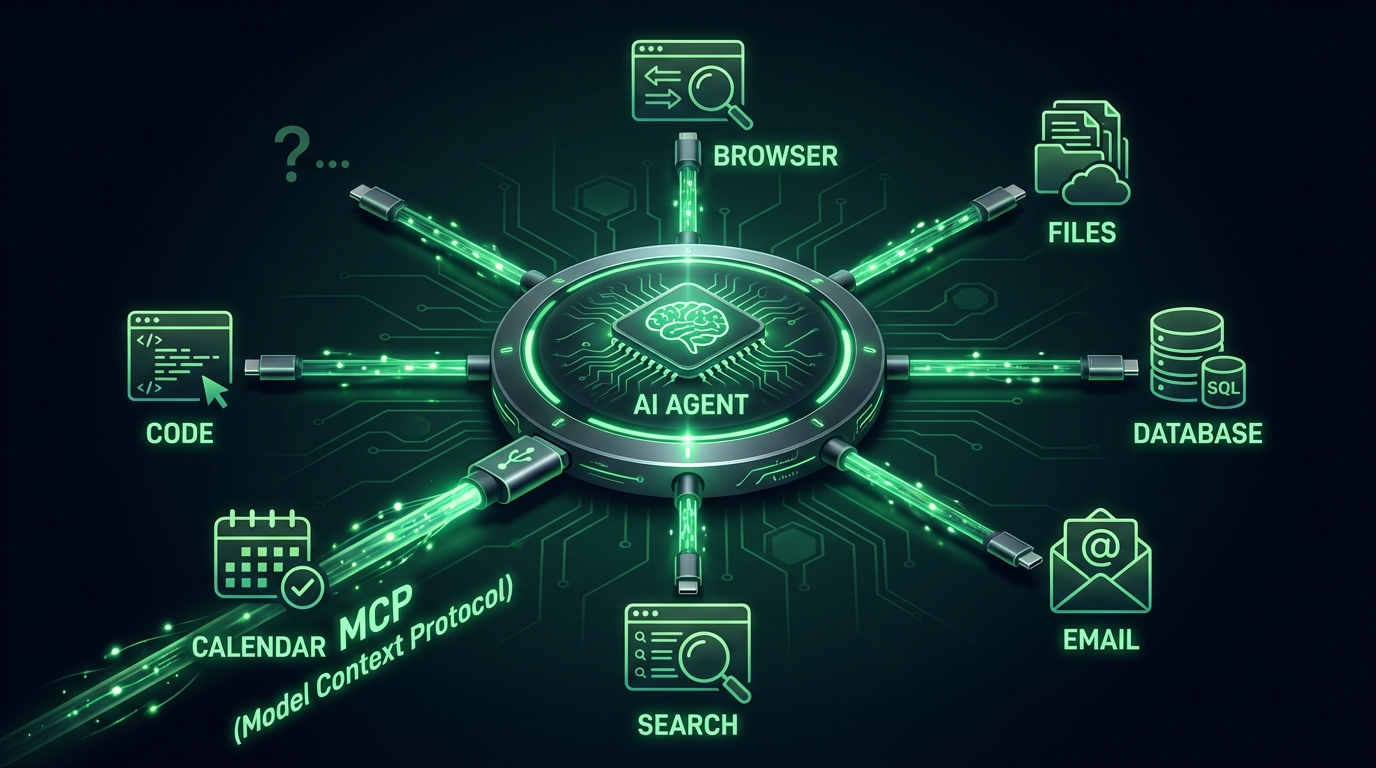
My OpenClaw setup uses MCP for:
- Web browsing: Standardized Playwright integration
- File operations: Safe filesystem access with permissions
- API calls: Rate-limited external service access
- Voice synthesis: TTS through multiple providers
- Image generation: Unified interface to Gemini, DALL-E, Midjourney
When I switch platforms, my agents' tools just work. MCP made my orchestration portable.
Platform Risk Is Real
Here's what nobody mentions: platform risk.
Peter Steinberger built OpenClaw, then joined OpenAI. OpenClaw's future is uncertain. CrewAI raised $18M but could pivot or get acquired. LangGraph is tied to LangChain's strategy.
I've been burned by platform changes before. Built a complex system on Rasa, then Facebook deprecated it. Months of work gone.
My hedge: build portable skills.
I write agents that work across platforms. I use MCP for tool standardization. I keep orchestration logic separate from platform-specific code.
When I need to migrate (and I will), it takes days, not months.
Self-Hosting vs Managed: The Real Trade-Off
Managed platforms are convenient. Self-hosted platforms give control.
I run OpenClaw self-hosted on my Pop!_OS infrastructure. Why?
Data sovereignty: My agent conversations stay on my hardware, under EU jurisdiction.
Customization: I can modify the platform for my specific needs.
Integration: Direct access to my development tools, file systems, and APIs.
Cost control: No per-agent pricing, no usage limits, no surprise bills.
But self-hosting requires expertise. You manage updates, security, monitoring, backups. Not everyone has time for that.
Managed platforms like CrewAI Cloud handle operations for you. Higher cost, less control, but you focus on orchestration instead of infrastructure.
Real Architecture: My Production Setup
Let me show you exactly how I orchestrate agents in production.
Platform: OpenClaw self-hosted on dedicated Pop!_OS machine
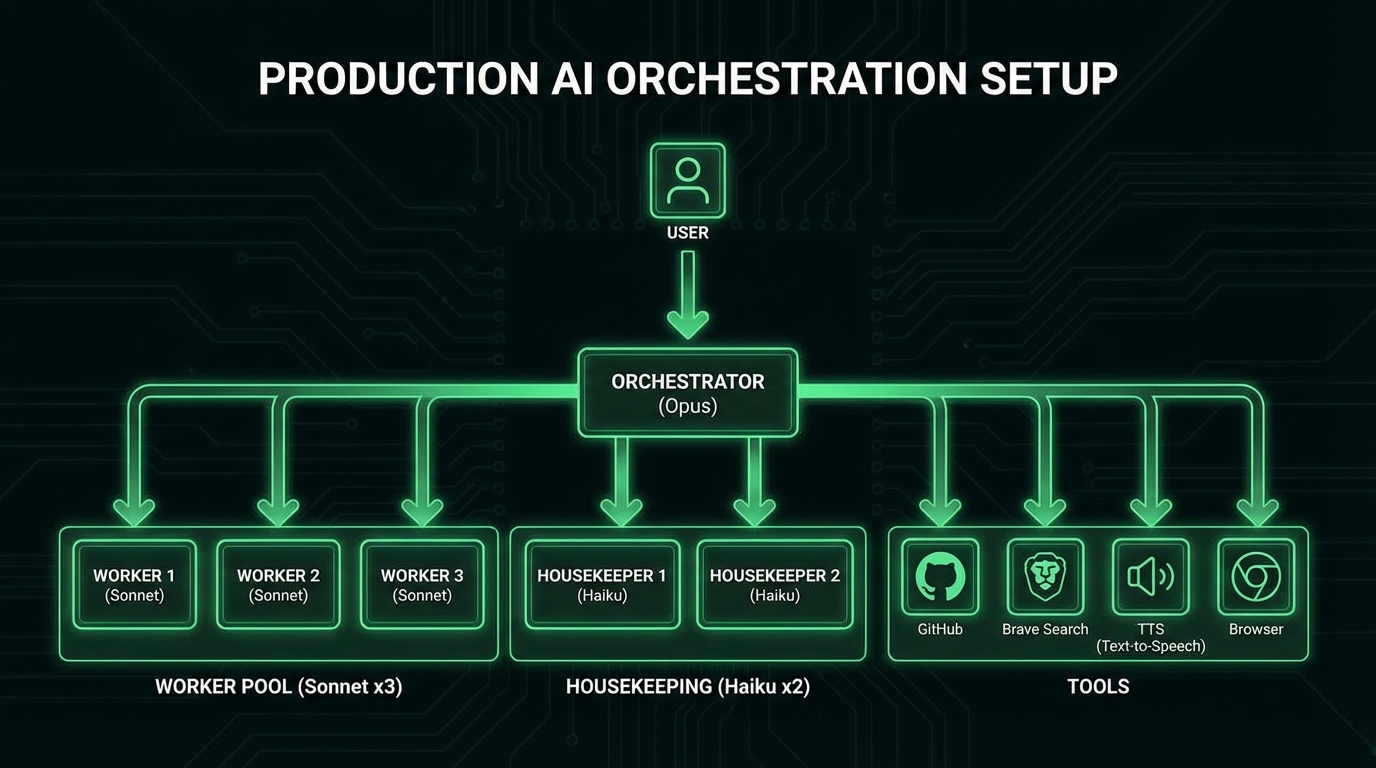
Orchestration: 3-tier hierarchy (Opus → Sonnet → Haiku)
Tool access: MCP protocol for standardized integrations:
- Brave Search API for web research
- Playwright for browser automation
- ElevenLabs for voice synthesis
- Gemini API for image generation
- GitHub API for code management
Monitoring: All agent actions logged, resource usage tracked, error alerting configured
Security: Agents run in Docker containers, limited filesystem access, API keys scoped to minimum permissions
Workflow: Git-based with feature branches, PR reviews, automated testing
This isn't a hobby project. This runs my business.
The Tool Ecosystem Reality
Platform choice determines your tool ecosystem.
OpenClaw tools: Deep system integration, powerful but complex
CrewAI tools: Business-focused, well-documented, limited customization
LangGraph tools: Technical, flexible, requires more development
AutoGen tools: Academic origins, great for research, lacking business features
I've found OpenClaw gives me the most powerful toolkit, but requires the most technical expertise. CrewAI is the best balance for most business users.
Integration Patterns That Work
After building dozens of orchestras, these patterns consistently work:
- Research Orchestra: Web search → content extraction → synthesis → citation
- Code Orchestra: Architecture → implementation → testing → review
- Content Orchestra: Research → writing → design → publishing
- Analysis Orchestra: Data gathering → processing → insights → reporting
Each pattern maps to specific agent roles with clear handoffs between stages.
The platform needs to support these handoffs cleanly. OpenClaw's agent communication primitives excel here. CrewAI's role-based system works well too.
Looking Forward: What's Coming
The orchestration platform space is moving fast.
Multi-modal agents: Vision, voice, and code in single agents. OpenClaw is leading here.
Autonomous deployment: Agents that ship their own code. CrewAI's recent updates show promise.
Cross-platform orchestration: Agents working across multiple platforms simultaneously. Early experiments with MCP are promising.
Local-cloud hybrid: Some reasoning local, some in cloud. Every platform is exploring this.
The winners will be platforms that embrace standards like MCP, provide powerful local capabilities, and integrate cleanly with existing development workflows.
My Recommendations
For technical teams: OpenClaw. Maximum flexibility, powerful integrations, full control.
For business teams: CrewAI. Fastest to production, excellent documentation, managed options.
For complex workflows: LangGraph. Best state management, sophisticated conditional logic.
For research/experimentation: AutoGen. Great for exploring multi-agent conversations.
Start with one platform. Build one successful orchestra. Learn the patterns. Then expand or migrate as needed.
The Bottom Line
Your platform choice determines what's possible with AI orchestration.
I chose OpenClaw because I needed maximum control and deep system integration. It took longer to learn but enabled orchestras impossible on other platforms.
You might choose differently based on your team, timeline, and technical constraints. That's fine.
What matters is choosing deliberately, not defaulting to what's easiest or cheapest.
Your digital orchestra deserves a proper stage. Build it thoughtfully.
Sources & Inspiration
- AI Agent Showdown 2026 — CrewAI 40% faster time-to-production than LangGraph
- Best AI Agent Frameworks 2025 — LangGraph for branching control, CrewAI/AutoGen for multi-agent
- Model Context Protocol Official — Ecosystem of data sources, tools, and apps standardization
- MCP Wikipedia — OpenAI officially adopted MCP in March 2025
- BCG MCP Analysis — "USB-C port for AI agents" standardization
- Complete Framework Guide — CrewAI/AutoGen for collaboration, LangGraph for state machines
- Claude Code vs Codex Comparison — Practical comparison of agents, models, costs, workflows
- AI Coding Agents Benchmark — Cursor leads setup, Claude Code best for rapid prototypes and terminal UX
Previously in this series:
More from “Build Your Own Orchestra”
Setting Up Your Stage: Infrastructure for AI Agent Orchestration
Your agents need their own home. Here's how I built mine.
Choosing Your Conductor: The AI Engine That Runs Your Orchestra
Your model choice makes or breaks everything. Here's what actually works.
Your First Orchestra: From Solo Act to Multi-Agent Symphony
Stop drowning in single-agent chaos. Here's how I built my first multi-agent workflow that saved me 4 hours a day.
The Compound Effect: From One Agent to an AI Organization
How I scaled from 1 agent to 13+ orchestras running simultaneously, and why memory is everything.