Setting Up Your Stage: Infrastructure for AI Agent Orchestration
By Conny Lazo
Agentic Engineer. Project Manager. Shipping software with AI agents.
Last month, I watched 13 AI agents work for me simultaneously. They researched, coded, generated images, and published content while I drank coffee. Total cost? $0 extra on my Claude subscription.
But none of this would be possible without the right stage.
The Mistake Everyone Makes
Most people try to run AI agents on their laptop. Same machine where they browse, game, and store personal files. This is like letting strangers into your bedroom.
I learned this the hard way. My first agent experiment crashed my main system during a 3GB file operation. That's when I realized: your agents need their own home.
Dedicated Infrastructure Is Non-Negotiable
I built my agent infrastructure on a separate Pop!_OS machine. Not shared. Not dual-boot. Dedicated.
Why? Control.
When my "Toscan" agent runs a deep research orchestra with 5 Sonnet workers, it needs CPU, memory, and disk I/O without competing with Spotify or Slack. When it's processing 46KB of research data into 114 project issues, the last thing I want is Chrome eating my RAM.
Your options:
VPS ($2-8/month): Hostinger starts at $1.99/mo, Atlantic.Net at $8/mo. Perfect for most orchestras. I use these for lightweight agents handling specific tasks.
Old laptop: That 2018 ThinkPad in your closet? Perfect. Install Linux, lock it down, give it purpose.
Raspberry Pi 5: $100 investment. Runs smaller agents beautifully. I have one handling my wife Evy's "Jeannie" assistant.
Cloud instance: AWS t3.micro, Google Cloud e2-small. Pay-per-use for experimental orchestras.
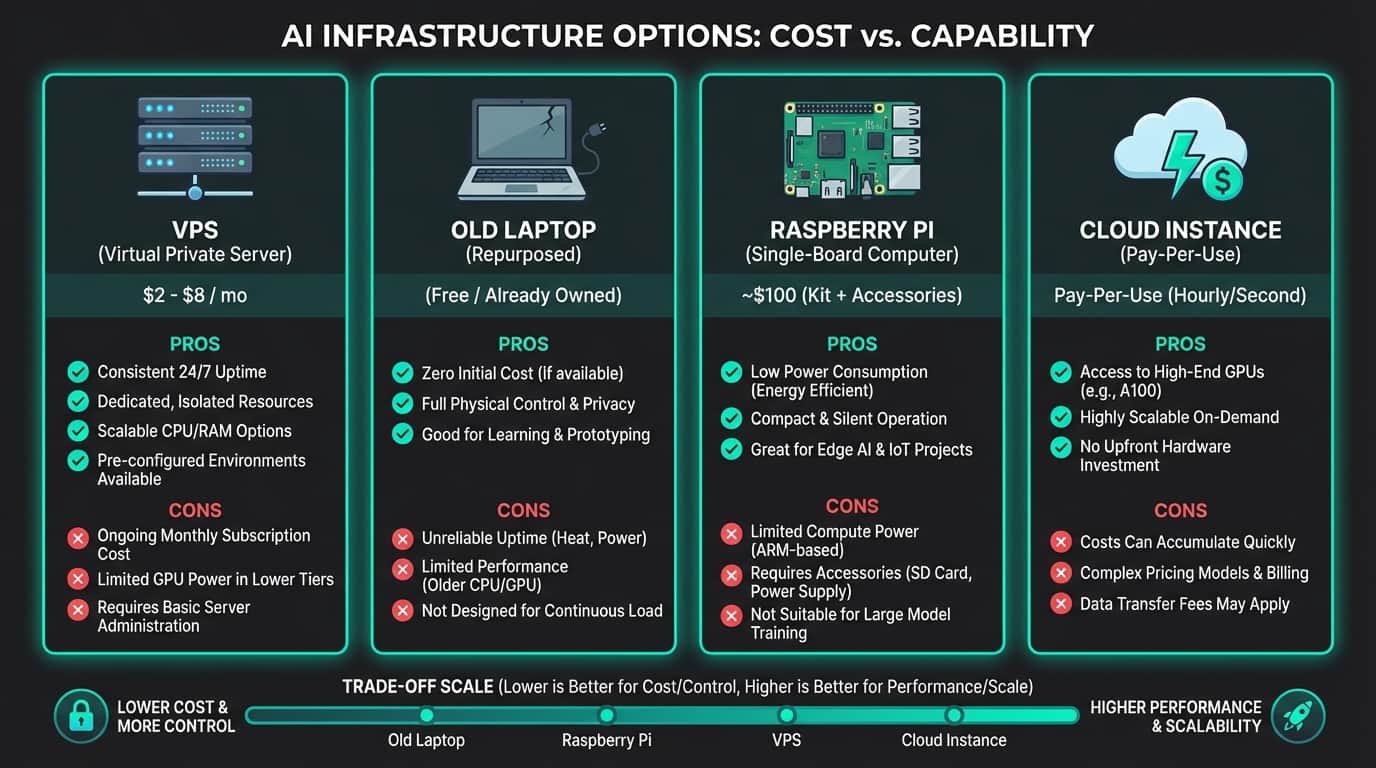
The key isn't power. It's isolation.
Why Linux Wins
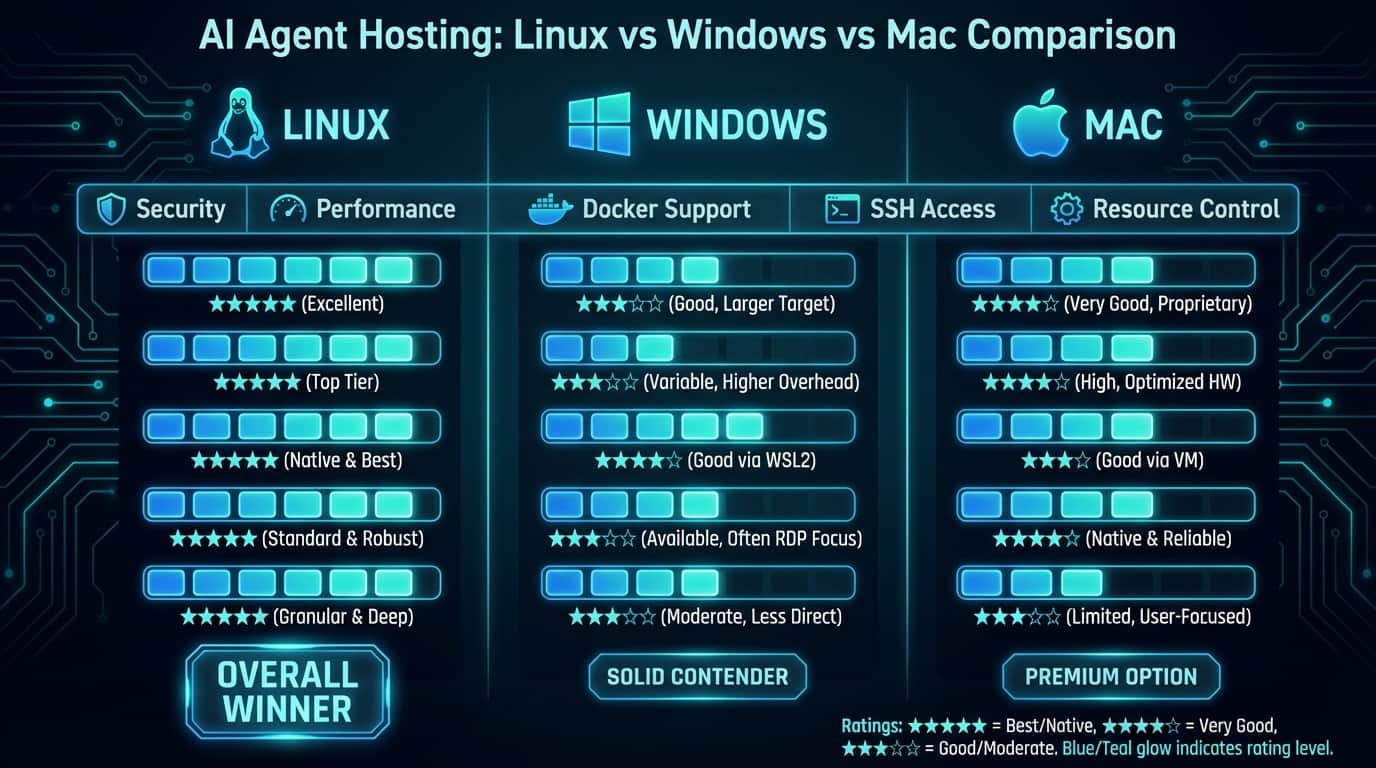
I run Pop!_OS on my main agent machine. Ubuntu works too. Mac is possible. Windows... works, but why make life harder?
Linux gives you better performance and security for AI hosting:
Security by default: No telemetry, no hidden services, no corporate backdoors.
Resource control: cgroups, systemd, proper process isolation.
Package management: Install dependencies without Windows DLL hell.
SSH access: Remote management without RDP bloat.
Docker native: Containerize agents without VM overhead.
I've seen Windows machines mysteriously reboot for updates mid-orchestra. Never again.
Your Agent Needs an Identity
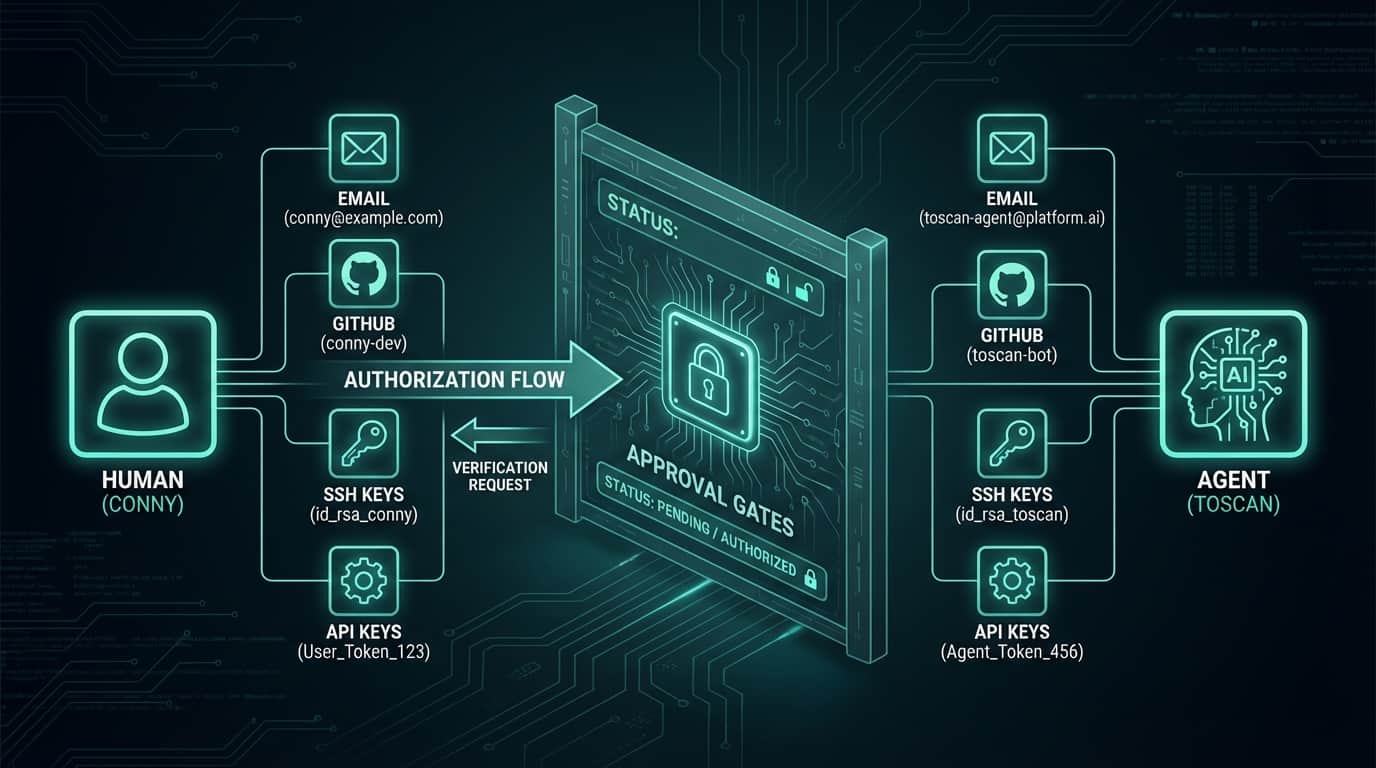
Here's what most tutorials miss: your agent needs its own digital identity.
Not yours. Its own.
Toscan has:
- Dedicated email: toscan@mydomain.com
- GitHub account: github.com/toscan
- SSH keys separate from mine
- API keys in its name
Why? Because when Toscan creates a PR, I want to review it as the human owner, not as myself reviewing myself. The psychology matters.
More importantly: security boundaries. Toscan's access is limited. It can't read my personal emails, can't access my banking APIs, can't push to main without my approval.
This isn't just good practice. In Europe, it's becoming legally required under the EU Digital Omnibus Act. Your AI agents handling personal data need clear access boundaries.
The Human Must Remain in Control
I see people giving agents full system access. Madness.
My setup uses defense in depth:
Branch protection: Agents work on feature branches. Main branch requires my review.
PR approval gates: Every code change goes through me.
API key scoping: Limited permissions, not admin access.
Automated monitoring: Logs everything, alerts on suspicious behavior.
Kill switches: One command stops all agents.
Remember: you're building a workspace for a digital employee, not a digital replacement for yourself.
Real Architecture: My Setup
Let me show you exactly how I built this.
Hardware: Dedicated Pop!_OS machine, 32GB RAM, 1TB NVMe SSD. Overkill for most agents, perfect for orchestras.
- Network: Tailscale mesh for secure access. No open ports to internet.
- Containerization: Each agent runs in Docker. Isolated filesystems, controlled networking.
- Identity: Toscan has dedicated accounts everywhere. Clean separation from my personal accounts.
- Orchestration platform: OpenClaw with MCP (Model Context Protocol) for standardized tool access.
- Version control: Git with automated backups. Every change tracked.
- Monitoring: Logs aggregated, alerts configured, resource usage tracked.
This isn't theory. I run this daily.
The Philosophy Shift
Here's what clicked for me: I'm not building AI tools. I'm building AI colleagues.
You wouldn't let a human colleague use your personal laptop, access your private files, or work without oversight. Same rules apply to AI agents.
Treat them like remote employees:
- Give them their own workspace
- Limit their access appropriately
- Monitor their work
- Maintain approval processes
- Pay for their resources
This mental shift changes everything about how you architect agent systems.
Start Simple, Scale Smart
Begin with one agent on one task. I started with a simple content research agent. Proved the infrastructure, learned the patterns, built confidence.
Then I added a coding agent. Then image generation. Now I run full orchestras.
Each addition taught me something about security, resource management, or workflow design. You can't learn this from tutorials. You have to build it.
Data Sovereignty Matters
If you're in Europe (like me in Austria), keep your agent infrastructure in EU. GDPR isn't just about user data—it applies to how your AI processes information too.
I use EU-based VPS providers for this reason. My agents' memory stays in EU jurisdiction.
American companies love to say "we're GDPR compliant" while running everything in Virginia. Build your own infrastructure. Control your data.
The Investment Pays Off
Setting up dedicated agent infrastructure costs time and money upfront. Worth every euro.
Last week, my Deep Research Orchestra processed 46 research sources while I was in meetings. My Code Shipping Orchestra reviewed 4 repositories in parallel. My Content Pipeline Orchestra wrote, illustrated, and scheduled this article.
None of that happens on a shared laptop.
Your agents deserve a proper stage. Give them one.
Build it right. Build it once. Then watch your digital orchestra perform.
Sources & Inspiration
- Cloudflare Moltworker Self-Hosted AI Agent — Self-hosted AI agent middleware without new hardware requirements
- AgentVPS: First AI-Native VPS Platform — Prebuilt environments with dynamic GPU allocation and token-based pricing
- Linux vs Windows Security Analysis — Comprehensive comparison showing Linux security advantages
- Aembit Agent Identity Management — Independent identity broker for AI agents and workloads
- EU Digital Omnibus Act Updates — Changes to Data Act, GDPR, and AI Act requirements
- Tiny AI Models for Raspberry Pi — Practical offline AI systems for edge computing
- Data Sovereignty for European Businesses — EU compliance requirements for 2025
Previously in this series:
- Coming next: Part 2: Choosing Your Conductor
- Coming later: Part 3: Building the Stage
More from “Build Your Own Orchestra”
Choosing Your Conductor: The AI Engine That Runs Your Orchestra
Your model choice makes or breaks everything. Here's what actually works.
Building the Stage: Platforms and Tools for AI Orchestration
The platform you choose determines what's possible. Here's what actually works.
Your First Orchestra: From Solo Act to Multi-Agent Symphony
Stop drowning in single-agent chaos. Here's how I built my first multi-agent workflow that saved me 4 hours a day.
The Compound Effect: From One Agent to an AI Organization
How I scaled from 1 agent to 13+ orchestras running simultaneously, and why memory is everything.